Chilli Procreate Color Palette: Streamlining Your Digital Art Workflow
Creating artwork in Procreate is easier and more fun when you have a coordinated or themed color palette at your fingertips. The moment you stop wrestling with the color wheel to find that perfect shade of burnt orange, you can start focusing on the actual creation process. This is exactly where the Chilli Procreate Color Palette comes into play. Instead of spending hours trying to match tones or guessing which colors will harmonize, this curated set allows you to dive straight into drawing, painting, and designing with confidence.
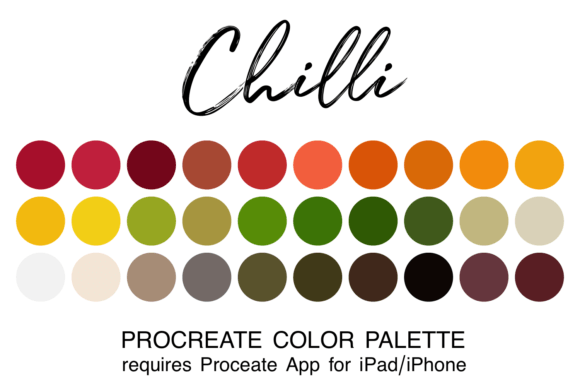
For digital artists, illustrators, and even casual hobbyists, color selection can often become the biggest bottleneck in a creative session. You might have a brilliant idea for a character design or a marketing graphic, but if you are stuck staring at a blank canvas wondering what background hue complements your foreground, momentum dies. By adding curated palettes to your Procreate assets, you remove the guesswork. The Chilli Procreate Color Palette offers a specific, cohesive collection of 30 colors designed to work together seamlessly, ensuring that every stroke you take contributes to a unified visual story.
Understanding the Chilli Collection
The Chilli Procreate Color Palette is not just a random assortment of reds and oranges; it is a thoughtfully constructed library of warm, vibrant, and earthy tones inspired by the heat and spice of chilies. These colors range from deep, rich crimsons and spicy paprika reds to golden yellows and muted terracotta browns. This specific temperature profile makes the palette incredibly versatile for projects that require energy, warmth, or a sense of organic texture.
What sets this resource apart is its format. You receive all 30 colors in a single file of the ".swatch" type, specifically engineered for use within the Procreate app. This means there is no need to manually pick hex codes or try to recreate shades using sliders. Once installed, these colors become a permanent part of your digital toolkit, ready to be accessed instantly whenever inspiration strikes. Whether you are sketching a quick concept or rendering a final piece, having these pre-matched hues ensures consistency throughout your work.
How to Install and Use Your New Swatches
Before you can utilize the Chilli Procreate Color Palette, there is a crucial prerequisite: you must have the Procreate app installed on your iPad or iPhone. While the app is available on various devices, the full functionality required for importing swatches is native to the iOS ecosystem. If you are a beginner just getting started with digital art, ensure your device meets the requirements before downloading any assets.
The installation process is designed to be straightforward, bridging the gap between your file manager and your art app efficiently. Here is how you get the palette running:
- Download the File: First, download the zipped file containing the palette to your iPad's "Downloads" folder. You can do this directly through the Files app on your device.
- Unzip the Archive: Navigate to the Downloads folder in the Files app and tap on the zipped file to unzip it. This will reveal the actual ".swatch" file inside.
- Open the Swatch: Click directly on the filename of the unzipped swatch. iOS is smart enough to recognize the file type and will automatically prompt you to open it in Procreate.
- Verify Installation: When you next open Procreate, click on the colored dot in the top right corner of your screen. Scroll through your list of palettes, and you will see the Chilli collection waiting for you.
Once you have located it, you can immediately start using it. For those who plan to use these warm tones frequently, there is also an option to set the Chilli Procreate Color Palette as your default palette. This small adjustment saves valuable time, ensuring that your favorite colors are always the first thing you see when you start a new project.
Real-World Applications for Creators
The utility of the Chilli Procreate Color Palette extends far beyond simple illustration. Its specific tonal range makes it a powerful tool for a variety of professional and personal scenarios. Let's look at how different types of users can leverage these colors in their daily workflows.
Food Bloggers and Culinary Illustrators
For food bloggers and culinary illustrators, capturing the essence of flavor visually is paramount. The Chilli palette is perfectly suited for illustrating spicy dishes, autumn harvest themes, or warm comfort foods. Imagine creating a header image for a blog post about homemade salsa or a recipe card for a pumpkin spice latte. Using a palette that already contains the exact shades of roasted peppers, turmeric, and cinnamon allows you to create appetizing visuals much faster than mixing colors from scratch. The result is a cohesive aesthetic that feels authentic and mouth-watering.
Brand Designers and Marketers
Entrepreneurs and marketers often struggle with maintaining brand consistency across different digital assets. If your brand identity revolves around energy, passion, or warmth—think coffee shops, fitness brands, or autumnal retail campaigns—the Chilli Procreate Color Palette provides a solid foundation. You can use these swatches to quickly mock up social media graphics, Instagram stories, or email newsletter headers. Because the colors are pre-coordinated, you avoid the common pitfall of clashing hues that can make a brand look unprofessional. It streamlines the design process, allowing you to produce high-quality promotional materials in a fraction of the time.
Educators and Content Creators
Teachers and online educators who create visual aids or course materials can also benefit significantly. When explaining concepts related to nature, geology, or even cultural festivals involving fire and spice, having a dedicated warm palette helps maintain visual interest without overwhelming the learner. An educator creating a slide deck or a digital worksheet can pull from the Chilli Procreate Color Palette to highlight key points, draw diagrams, or add decorative elements that keep students engaged. The consistency of the colors ensures that the learning material looks polished and intentional.
Hobbyists and Journalers
On a personal level, hobbyists using Procreate for bullet journaling or digital scrapbooking find that themed palettes add a layer of sophistication to their pages. If you are documenting a summer vacation, planning a wedding with an autumn theme, or simply keeping a gratitude journal, the Chilli colors provide a warm, inviting backdrop. They encourage creativity by removing the pressure of color theory, letting you focus on the content of your journal rather than the mechanics of color picking.
Factors to Consider Before Downloading
While the Chilli Procreate Color Palette is a robust tool, it is important to consider your specific needs before integrating it into your workflow. Not every project requires a warm, spicy color scheme. If you are working on a project that demands cool blues, sterile medical whites, or neon cyberpunk aesthetics, this specific palette might not be the primary choice. However, even in those cases, having a strong complementary set of warm colors can be useful for contrast.
Additionally, consider your current skill level. Beginners often feel overwhelmed by the infinite possibilities of the digital color spectrum. Having a finite set of 30 curated colors can actually be liberating, acting as a constraint that forces creative problem-solving within a defined boundary. For advanced users, it serves as a quick reference to jumpstart ideas without breaking flow. Ultimately, the value lies in how well the palette aligns with the mood and message you wish to convey.
By adopting the Chilli Procreate Color Palette, you are investing in a smoother, more enjoyable creative experience. It transforms the tedious task of color selection into a seamless part of your artistic journey, allowing you to produce better work, faster. Whether you are a seasoned professional or a curious beginner, having the right tools at your disposal makes all the difference in turning a fleeting idea into a finished masterpiece.