Mastering the Watercolor Snowman: A Complete Tutorial and Palette Guide
Creating illustrations in Procreate becomes significantly easier and more enjoyable when you have a consistent, themed color palette at your disposal. Instead of spending valuable creative energy hunting for the perfect shade of blue or white, you can dive straight into the artistic process. This is exactly why the Watercolor Snowman, Tutorial, Palette resource was designed. It offers a curated collection of tools that streamline your workflow, allowing you to focus on brushwork, composition, and storytelling without the distraction of color theory guesswork.
Why a Themed Palette Changes Your Creative Flow
For many digital artists, the blank canvas is intimidating not because of the drawing itself, but because of the overwhelming number of color choices available. When you are trying to capture the soft, ethereal quality of winter snow, selecting colors from a generic library often leads to muddy tones or harsh contrasts that ruin the watercolor effect. By using a dedicated Watercolor Snowman palette, you bypass this friction point entirely.
This specific resource provides a pre-selected range of hues optimized for winter scenes. These aren't just random shades; they are carefully chosen to mimic the translucency and layering capabilities of real watercolor paint. Whether you are a beginner struggling to understand how to blend cool grays with warm shadows, or an experienced illustrator looking to speed up a commission, having these swatches ready means you can start painting immediately. The result is a cohesive look where every element, from the snowman's scarf to the icy background, feels like it belongs in the same world.
What Is Included in the Resource Pack?
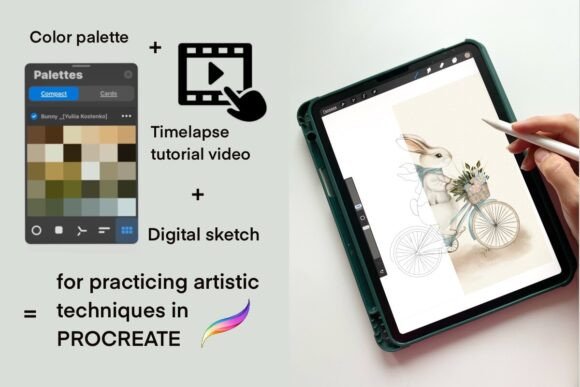
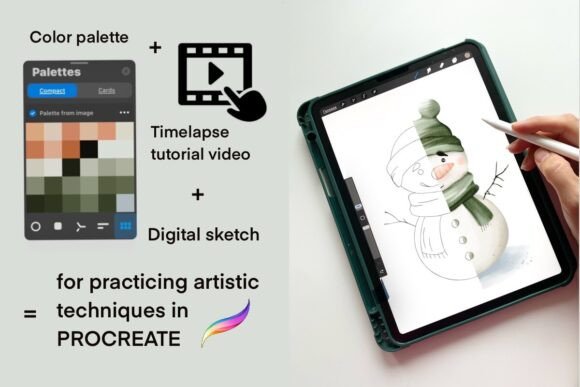
The Watercolor Snowman, Tutorial, Palette package is designed to be a comprehensive toolkit for digital artists working on iPad. It goes beyond a simple list of hex codes, offering everything needed to replicate a professional winter illustration style. Here is what you get inside:
- One Digital Sketch: A high-quality PNG file with a transparent background. This serves as your foundational line art, perfectly suited for coloring practice or commercial use.
- One Color Palette: A .swatches file specifically formatted for Procreate. This contains the exact hues used to achieve the signature watercolor look.
- Time-Lapse Video Tutorial: A PDF file containing a direct link to a YouTube playlist. This visual guide walks you through the entire creation process, showing brush strokes, layering techniques, and blending methods in real-time.
These components work together to create a structured learning environment. The sketch gives you something to draw over, the palette ensures your colors are harmonious, and the video tutorial bridges the gap between knowing what to do and actually doing it.
Real-World Applications for Creators and Businesses
While this tool is excellent for personal hobbyists, its utility extends far beyond casual doodling. Professionals across various industries can leverage the Watercolor Snowman, Tutorial, Palette to solve specific design challenges quickly.
For Educators and Art Teachers
Art educators often struggle to find resources that simplify complex techniques for students. This kit provides a perfect starting point for teaching digital watercolor effects. You can assign the sketch to students and ask them to use the provided palette to learn about value and temperature. Because the palette is pre-set, students can focus on understanding how light interacts with snow rather than getting frustrated by color selection. It creates a standardized learning experience where everyone starts with the same high-quality assets.
For Social Media Managers and Marketers
In the fast-paced world of social media, consistency is key. Brands often need seasonal content—think holiday cards, Instagram stories, or blog headers—without hiring a full-time illustrator. Using this resource allows marketers to generate unique, hand-drawn style graphics in minutes. The time-lapse tutorial ensures that even non-artists can follow along to create custom variations of the snowman, adding their own brand colors or text while maintaining a professional aesthetic. This saves money on stock photography fees and provides original, copyright-safe imagery.
For Small Business Owners and Etsy Sellers
If you run a shop selling digital prints, greeting cards, or planners, having a library of themed assets is invaluable. The Watercolor Snowman illustration can be adapted into stickers, wall art, or packaging designs. Since the file includes a transparent background PNG, it is incredibly versatile. You can place the snowman onto different backgrounds, combine it with other elements, or resize it for various print formats. The included tutorial helps you expand your skill set, enabling you to create a whole series of winter-themed products based on the same technique.
How Different Users Benefit from the Workflow
The beauty of this resource lies in its adaptability. A seasoned freelancer might use the palette to quickly mock up a concept for a client, demonstrating how a winter campaign could look visually. They appreciate the speed and the ability to produce polished results under tight deadlines. Conversely, a hobbyist returning to art after a long break finds comfort in the guided approach. The tutorial acts as a mentor, breaking down the steps so there is no fear of making mistakes.
Even entrepreneurs who aren't artists can benefit. Imagine a small business owner who wants to send personalized holiday emails to their clients. Instead of buying generic templates, they can download the sketch, apply the palette, and add their company logo. The final result looks bespoke and thoughtful, strengthening customer relationships without requiring hours of labor.
Technical Setup: Getting Started on Your iPad
To make the most of this resource, there are a few technical considerations you must keep in mind. First and foremost, this product is digital-only. No physical goods will be shipped to your door. Everything is delivered instantly via download links, meaning you can start creating the moment you receive your files.
A critical requirement is that you must have the Procreate app installed on your iPad. The color swatch file (.swatches) is proprietary to Procreate and cannot be opened in other applications like Photoshop or Canva. If you are new to the app, don't worry; the installation process is straightforward once you know the steps.
- Download the compressed zip file containing your resources.
- Open the Files app on your iPad and navigate to your Downloads folder.
- Tap the zip file to unzip it automatically.
- Locate the .swatches file within the unzipped folder.
- Long-press the file and select "Copy," then open Procreate.
- Navigate to the Paintbrushes menu, go to the Swatches tab, and paste the file name. It will automatically import into your library.
Once imported, the palette is ready to use. You can tap any color to fill a layer or use it as a reference for your custom brushes. This seamless integration ensures that your transition from downloading to creating is smooth and uninterrupted.
Considerations Before You Download
Before investing in the Watercolor Snowman, Tutorial, Palette, consider your current setup and goals. Are you comfortable using an iPad for art? Do you have the necessary hardware to run Procreate smoothly? While the tutorial is helpful, it assumes a basic familiarity with touch gestures and layer management. If you are completely new to digital art, you might want to spend a few days exploring the free features of Procreate before diving into this specific project.
Additionally, think about how you plan to use the final artwork. If you intend to sell the illustrations commercially, review the license terms included with your purchase to ensure your intended use is permitted. For personal projects, educational workshops, or internal marketing materials, this resource is an ideal way to elevate your visual content without needing years of formal training.
Ultimately, the goal of this toolkit is to remove the barriers to entry for digital watercolor art. By providing the sketch, the colors, and the method all in one place, it empowers you to create beautiful, seasonally appropriate illustrations that resonate with your audience. Whether you are decorating a blog post, designing a holiday card, or simply enjoying a relaxing afternoon of digital painting, the Watercolor Snowman, Tutorial, Palette gives you the foundation to succeed.